How to Find, Control and Secure Unsanctioned AI Use
AI is already inside the enterprise, even when it is not officially approved. Employees use public AI tools to summarize documents, write code, draft client emails, analyze spreadsheets, generate reports, troubleshoot systems, and speed up repetitive work. The problem is not AI itself. The problem is unmanaged AI use without visibility, policy, access control, data protection, monitoring, or audit readiness. That is where shadow AI risk becomes a security and compliance issue. Shadow AI appears when teams use AI tools, browser extensions, copilots, APIs, AI agents, or automation platforms without IT, security, legal, or compliance approval. It can start with one harmless prompt. It can grow into sensitive data exposure, uncontrolled SaaS adoption, insecure integrations, intellectual property leakage, or audit failure. For modern teams, the goal is not to block AI. The goal is to make AI visible, controlled, secure, and useful.
Why Shadow AI Has Become a Board-Level Security Concern
The pressure is coming from both sides. On one side, employees want faster work. AI helps them move quickly, remove manual effort, and solve problems without waiting for new tools or process changes. On the other side, attackers are also using AI to move faster. The Verizon 2026 DBIR highlights generative AI as a force multiplier for attack techniques, while IBM’s Cost of a Data Breach research warns that AI adoption without security and governance increases exposure. That combination makes shadow AI risk more than an IT hygiene problem. It affects:
- Data security and privacy.
- Intellectual property protection.
- Secure software delivery.
- Regulatory compliance.
- Vendor and third-party risk.
- Identity and access management.
- Incident detection and response.
- Customer trust and business continuity.
For decision-makers, the question is no longer “Are employees using AI?” They are. The real question is: “Can we see where AI is used, what data it touches, and how it is controlled?”
Shadow AI Control Checklist for Security and Compliance
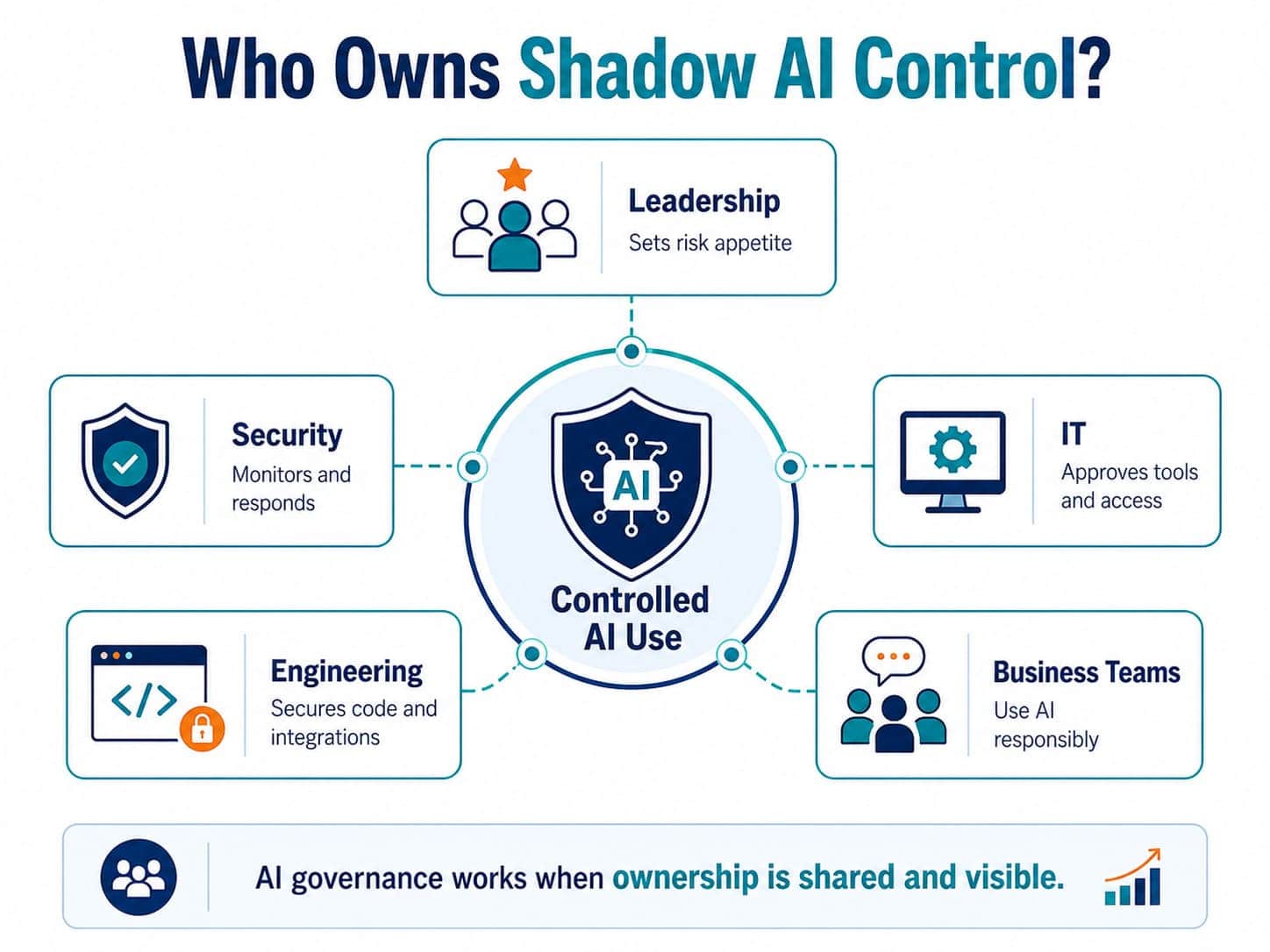
A practical assessment should move from discovery to remediation. The checklist below helps security, compliance, IT, and engineering teams create a clear control path without slowing down useful AI adoption.
1. Build a Clear AI Usage Inventory
You cannot govern what you cannot see. Start by mapping where AI is already being used across departments, applications, cloud platforms, browsers, development tools, SaaS products, and automation workflows. Check for:
- Public AI chat tools used for business tasks.
- AI browser extensions and plug-ins.
- AI features inside approved SaaS platforms.
- Developer copilots and code assistants.
- AI APIs connected to internal tools.
- AI agents used in workflows or service operations.
- AI-generated code, content, reports, or customer-facing outputs.
- Unapproved accounts created with corporate emails.
- AI usage hidden inside procurement, marketing, HR, finance, support, or engineering workflows.
The first deliverable should be simple: a working AI asset inventory with owners, business purpose, data types, access levels, and risk tier.
2. Classify Data Before Setting Controls
Not every AI use case creates the same level of exposure. A team using AI to rewrite a public blog intro is different from a team pasting customer data, source code, contracts, credentials, payment details, health information, or internal financial reports into an external tool. Classify AI usage by data sensitivity:
- Public data: low risk, but still needs basic policy.
- Internal data: requires approved tools and access control.
- Confidential data: requires strict handling, logging, and review.
- Regulated data: requires compliance validation before AI processing.
- Source code and architecture: requires secure development controls.
- Customer data: requires privacy, contractual, and regional review.
This step turns AI governance from abstract policy into practical AI security.
3. Write AI Policy That Teams Can Actually Follow
A policy that only says “do not use AI” will fail. Employees use AI because they are trying to work faster. A useful policy must define approved behavior, not only prohibited behavior. A strong AI governance policy should explain:
- Which AI tools are approved.
- Which data types are allowed or restricted.
- Which use cases need security review.
- Which teams can approve new AI tools.
- How employees should handle prompts and outputs.
- What must never be entered into public AI systems.
- How AI-generated code, content, or decisions must be reviewed.
- How violations or accidental exposure should be reported.
The policy should be short enough to read, specific enough to enforce, and practical enough to support real work.
4. Add Controls Into Existing IT and DevOps Workflows
Shadow AI is difficult to control when security is handled separately from daily operations. The better approach is to embed controls into the systems teams already use. This includes identity management, endpoint protection, browser management, SaaS security, DevOps pipelines, data loss prevention, logging, and access review. For engineering teams, DevOps services can support safer AI adoption by bringing security checks into CI/CD pipelines, infrastructure workflows, monitoring, and release processes. For product teams, software development services can help build AI-enabled features with secure architecture, proper API handling, human review, and controlled data flows. Controls may include:
- SSO and MFA for approved AI platforms.
- Role-based access control.
- Data loss prevention rules.
- Endpoint and browser restrictions.
- Approved vendor lists.
- Secure API gateways.
- Logging and audit trails.
- Code review for AI-generated code.
- Secrets scanning.
- Prompt and output review rules.
- Vendor security assessment before adoption.
Good controls do not stop innovation. They make safe adoption repeatable.
5. Monitor AI Activity and Data Movement
Shadow AI often hides in normal work patterns. Security teams should monitor for signs of unmanaged AI usage across endpoints, networks, cloud environments, identity systems, browsers, SaaS platforms, repositories, and data stores. Signals to watch:
- Unapproved AI domains accessed from corporate devices.
- Corporate email accounts used to register AI tools.
- Sensitive files uploaded to unknown SaaS platforms.
- New browser extensions with AI functionality.
- AI APIs called from internal systems.
- Source code copied into external tools.
- Large data transfers to unsanctioned applications.
- Unusual authentication activity.
- New automation workflows built outside IT review.
This is where Security Operations becomes critical. Continuous monitoring, incident response, vulnerability management, SIEM support, and security process management help organizations detect risky AI use before it turns into a breach or compliance event.
6. Remediate High-Risk AI Use Without Creating Resistance
The goal is not to punish teams for using AI. The goal is to move useful AI work into a safer operating model. When risky use is found, classify the response:
- Allow: low-risk use with basic guidance.
- Approve: acceptable use after registration and review.
- Restrict: allowed only with specific controls or data limits.
- Replace: move users to an approved enterprise AI tool.
- Block: prohibit tools or workflows that create unacceptable exposure.
- Investigate: review cases involving sensitive data, credentials, regulated information, or suspicious activity.
Remediation should include both technical fixes and operational guidance. Teams need approved alternatives, not only restrictions.
Shadow AI Risk Matrix for Security Teams
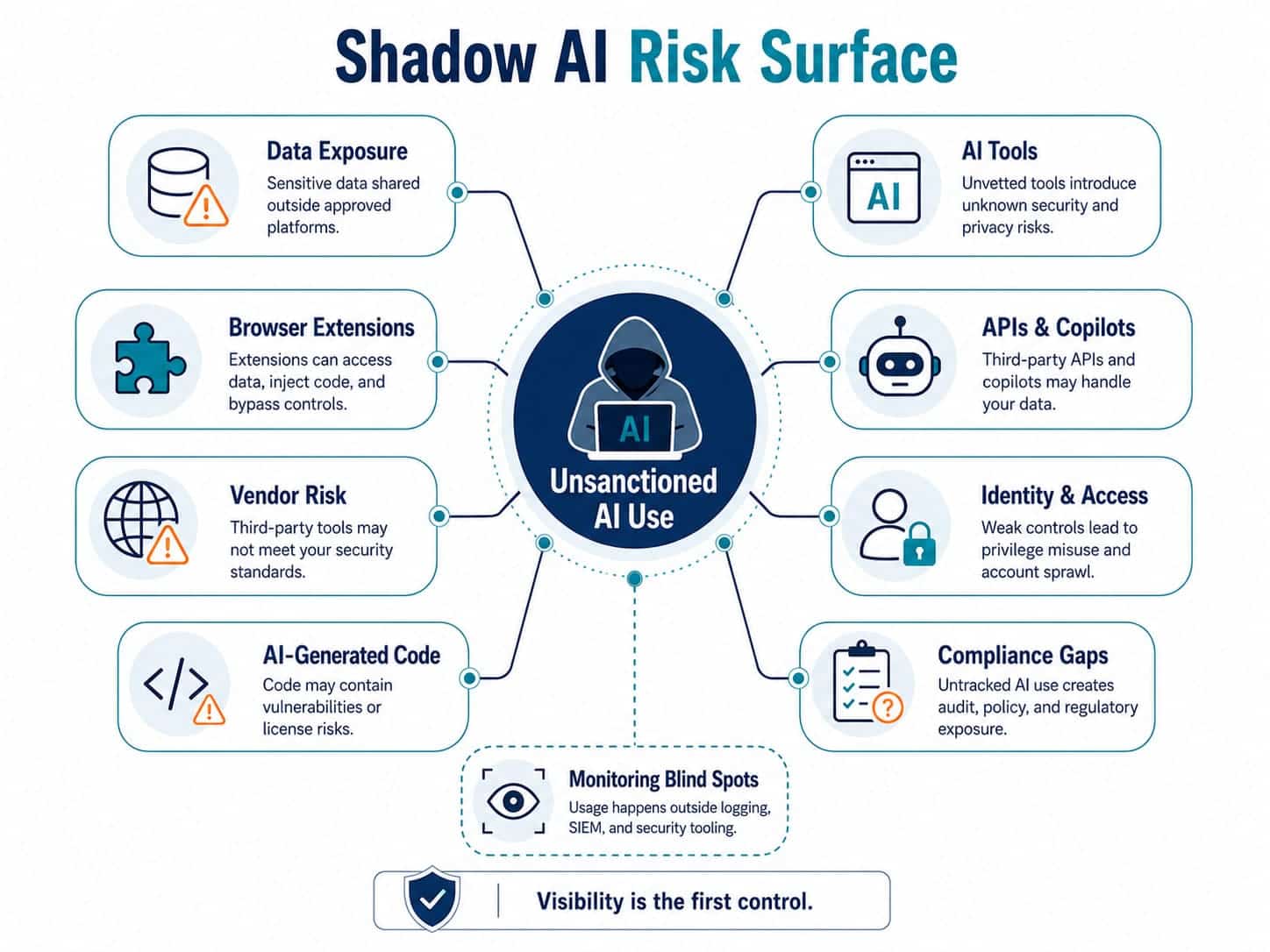
Use this table to prioritize what must be assessed first during a security compliance assessment.
| Risk Area | What to Check | Warning Signs |
Priority Response |
| Data exposure | What employees enter into AI tools | Customer records, contracts, source code, credentials, financial data, or regulated data in prompts | Restrict use, review exposure, apply DLP, define approved data rules |
| Tool approval | Which AI tools are used across teams | Unknown SaaS accounts, free public AI tools, browser extensions, unapproved APIs | Build an inventory, classify tools, approve or block based on risk |
| Identity and access | Who can access AI platforms and integrations | Shared accounts, no SSO, no MFA, weak offboarding process | Enforce SSO, MFA, RBAC, access review, and account lifecycle controls |
| Software delivery | How AI-generated code is created and reviewed | AI-written code merged without security review or testing | Add code review, SAST, secrets scanning, dependency checks, and QA gates |
| Vendor risk | How AI vendors process and store data | Unknown data retention, unclear model training terms, weak audit evidence | Run vendor security review and legal/compliance validation |
| Monitoring | Whether AI activity is visible to security teams | No logs, no alerts, no SIEM visibility, no incident workflow | Add monitoring, detection rules, escalation paths, and reporting |
| Compliance | Whether AI use maps to regulatory obligations | No policy, no audit trail, no data classification, no ownership | Create governance controls, evidence collection, and compliance reporting |
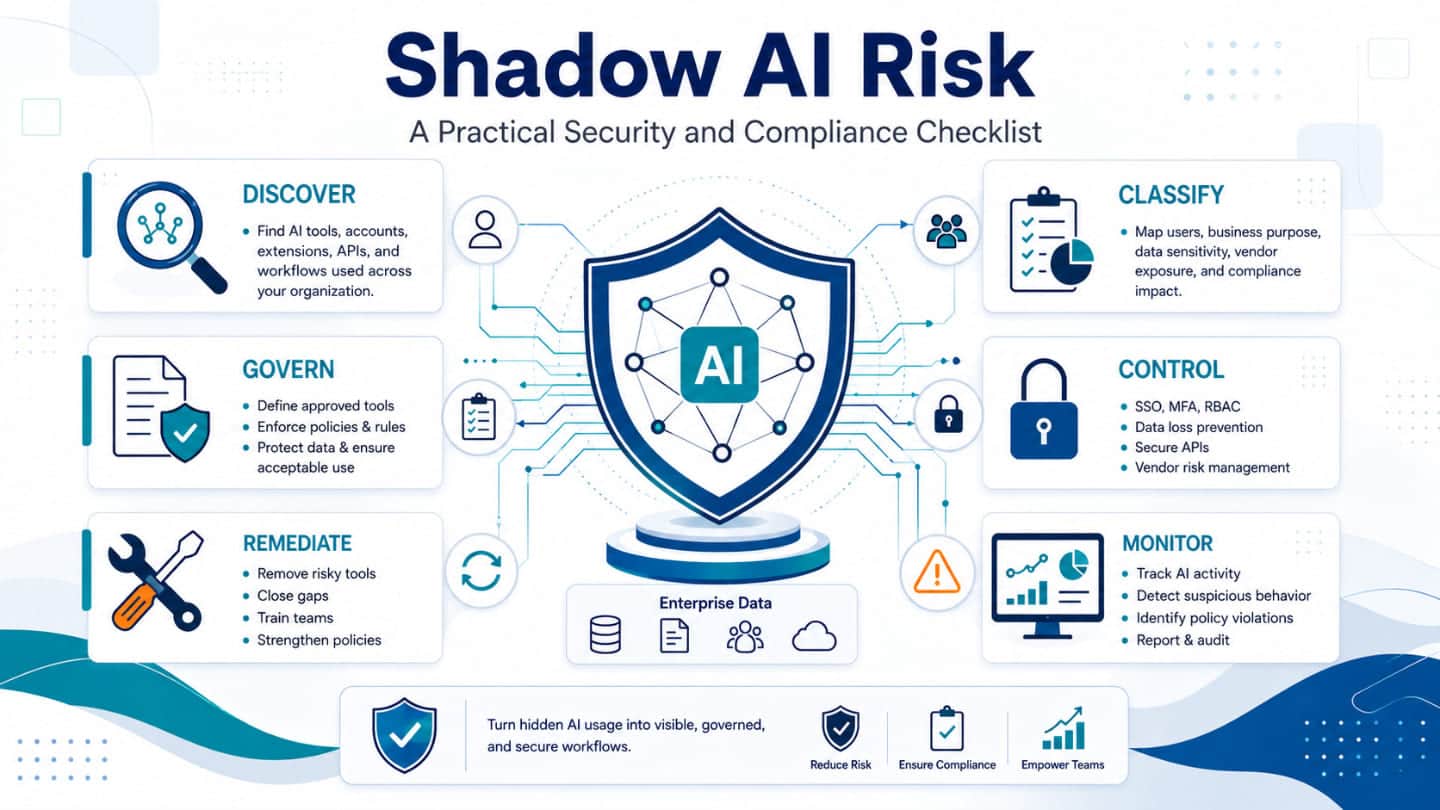
Shadow AI Control Map
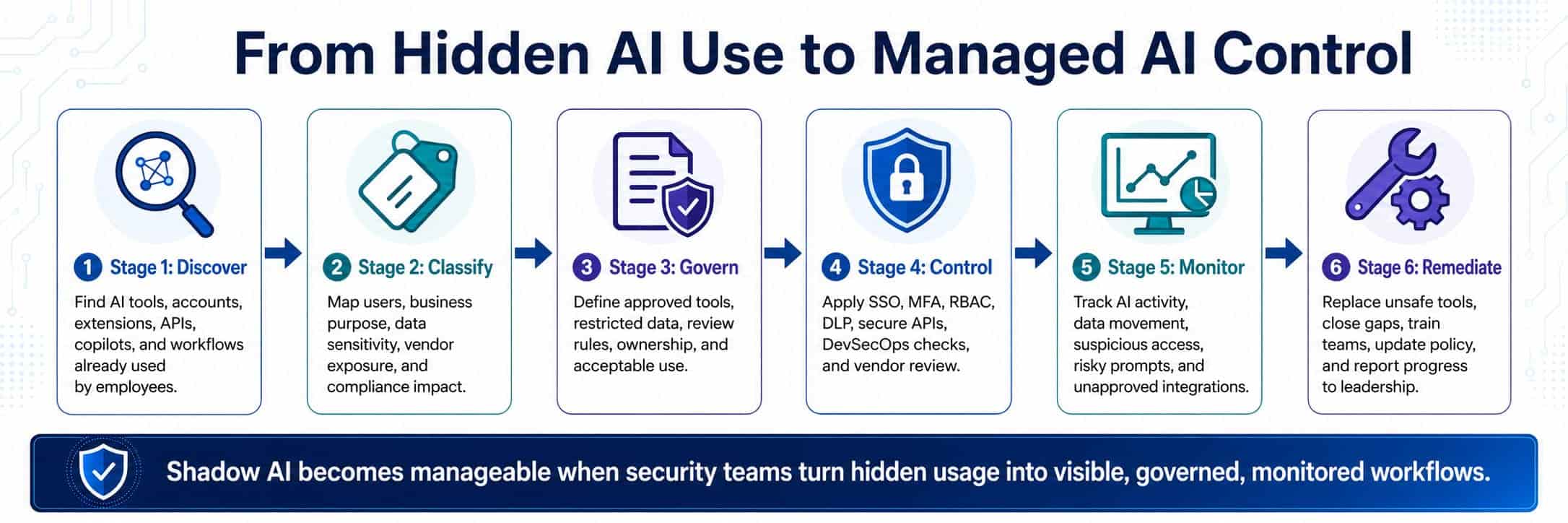
Dealing with shadow AI usually follows a standard sequence. It starts with discovery to see what tools people are actually using, followed by classification to sort out the risk levels. From there, you set your policies and put technical controls in place. The process wraps up with ongoing monitoring and a plan for remediation when something goes wrong. It is a straightforward way to look at how all these pieces fit together to manage unapproved apps.
What GFL Assesses During a Shadow AI Security Review
GFL helps organizations turn unclear AI exposure into a practical remediation roadmap. A security and compliance assessment can cover:
- AI tool discovery across departments and environments.
- Shadow AI usage mapping.
- Data sensitivity and exposure analysis.
- AI governance policy review.
- Identity and access control validation.
- SaaS and vendor risk assessment.
- DevOps and software delivery control review.
- Endpoint, browser, and network monitoring gaps.
- Vulnerability and configuration checks.
- Incident response readiness.
- Compliance evidence and reporting gaps.
- Remediation planning by risk priority.
The result is not just a list of findings. It is a clear path from uncontrolled AI use to safer adoption.
From Findings to a Safer AI Operating Model
A good assessment should produce decisions the business can act on. After discovery, GFL helps define what to approve, what to restrict, what to replace, and what to monitor. This keeps the organization moving without allowing AI usage to expand blindly. A practical roadmap may include:
- AI inventory and ownership model.
- Approved AI tool list.
- Data handling rules for AI prompts and outputs.
- Security controls for access, logging, and monitoring.
- DevSecOps checks for AI-assisted software delivery.
- Vendor review process for AI-enabled platforms.
- Incident response playbook for AI-related exposure.
- Compliance reporting structure for leadership and auditors.
- Training for employees, developers, and business teams.
- Continuous improvement through Security Operations monitoring.
This is how AI governance becomes operational. It moves from policy documents into daily tools, workflows, and security processes.
Run a Security and Compliance Assessment with GFL
Shadow AI risk is already present in many organizations. Waiting for a breach, audit finding, or customer complaint is the expensive way to discover it. GFL helps businesses identify hidden AI usage, assess exposure, close security gaps, and build practical controls around modern AI adoption. Run a security and compliance assessment with GFL to:
- Find unsanctioned AI tools and workflows.
- Understand where sensitive data may be exposed.
- Create practical AI governance controls.
- Strengthen AI security across users, systems, and delivery pipelines.
- Improve monitoring and incident readiness.
- Build a remediation roadmap leadership can act on.
AI can improve productivity, delivery, and decision-making. With the right controls, it can do that without creating unnecessary security and compliance risk. Run a security and compliance assessment with GFL.
FAQs
What is shadow AI risk?
Shadow AI risk is the business, security, and compliance exposure created when employees or teams use AI tools without formal approval, visibility, or control. This may include public AI chat tools, AI browser extensions, code assistants, AI APIs, SaaS AI features, or autonomous agents used outside IT and security governance.
Why does it matter for enterprise software?
Enterprise software often contains sensitive data, source code, credentials, business logic, customer records, integrations, and infrastructure details. When AI tools are used without controls, that information may be exposed, stored, reused, or processed in ways the company cannot verify. Shadow AI can also introduce insecure code, weak architecture decisions, and undocumented dependencies.
How can a company start safely?
Start with discovery. Identify which AI tools are already used, who owns them, what data they process, and which business workflows depend on them. Then create a simple policy, approve safe tools, restrict sensitive data use, and add monitoring. The first step should be visibility, not a blanket ban.
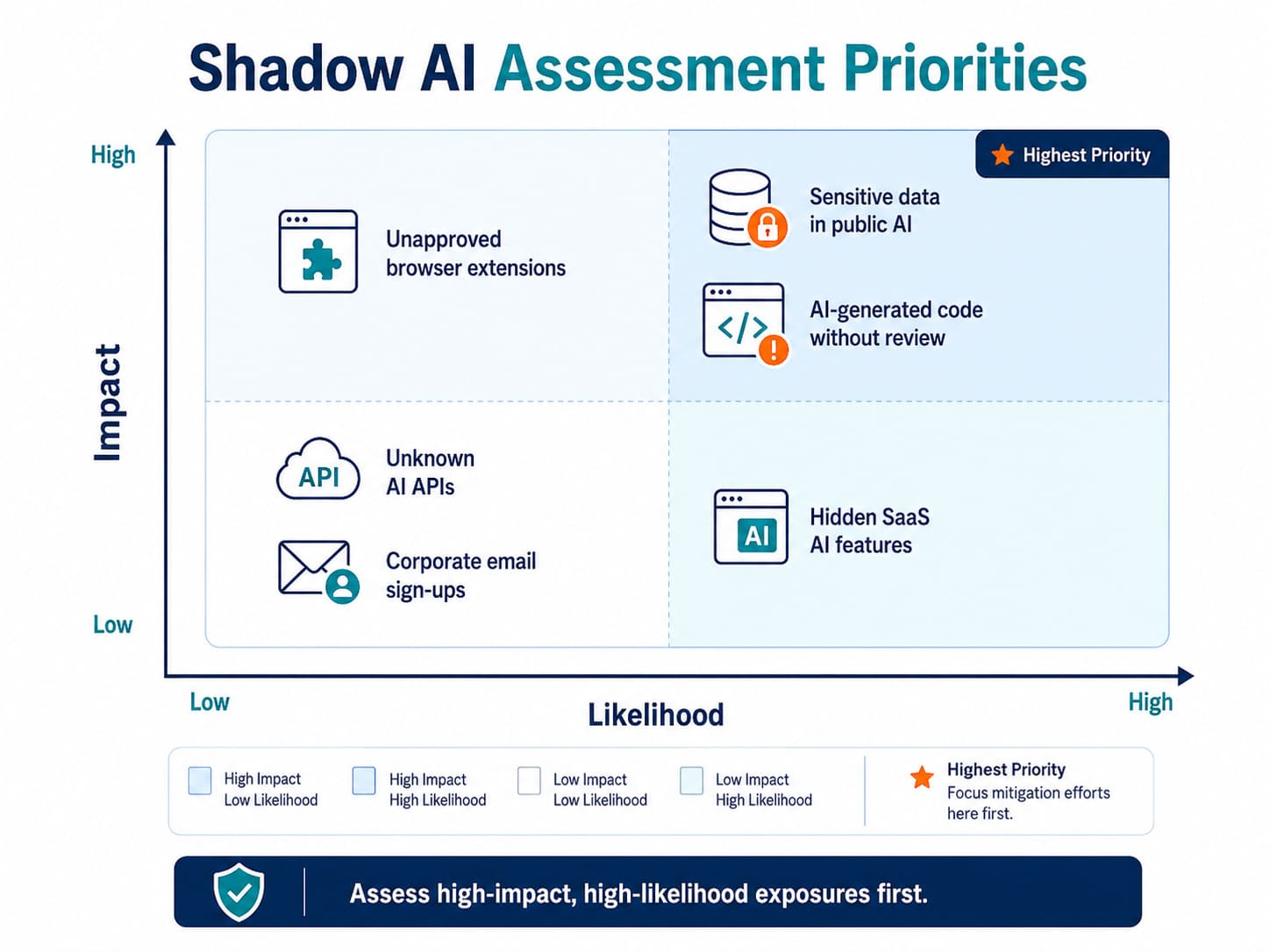
What risks should be assessed first?
Assess sensitive data exposure first. Then review identity access, AI vendor terms, source code usage, regulated data handling, browser extensions, AI APIs, logging gaps, and incident response readiness. High-risk use cases should be prioritized when they involve confidential data, customer information, intellectual property, credentials, or production systems.
How can GFL help?
GFL can run a security and compliance assessment to discover shadow AI usage, classify risk, review controls, identify monitoring gaps, and create a practical remediation roadmap. GFL’s Security Operations capabilities support monitoring, vulnerability management, incident response, penetration testing, security tools management, and ongoing improvement of the organization’s security posture.