How Enterprises Can Coordinate AI Agents Without Creating Chaos
AI agents are moving from experimental assistants to enterprise workflow participants. They can analyze requests, retrieve data, trigger actions, update records, escalate issues, and collaborate with other agents across business systems. That is where the real challenge begins. A single agent can be useful. A group of agents can be powerful. But without architecture, permissions, observability, and rollback, multi-agent systems can quickly become unpredictable automation layers that are hard to audit and harder to trust.
For enterprises, the question is no longer “Can we build an AI agent?” The better question is: “Can we coordinate agents safely across real business processes?” This guide explains how multi-agent systems work, where they fit in enterprise AI automation, what architecture decisions matter, and how companies can move from isolated pilots to governed, production-ready AI agent orchestration.
Enterprise Automation Is Becoming a Coordination Problem
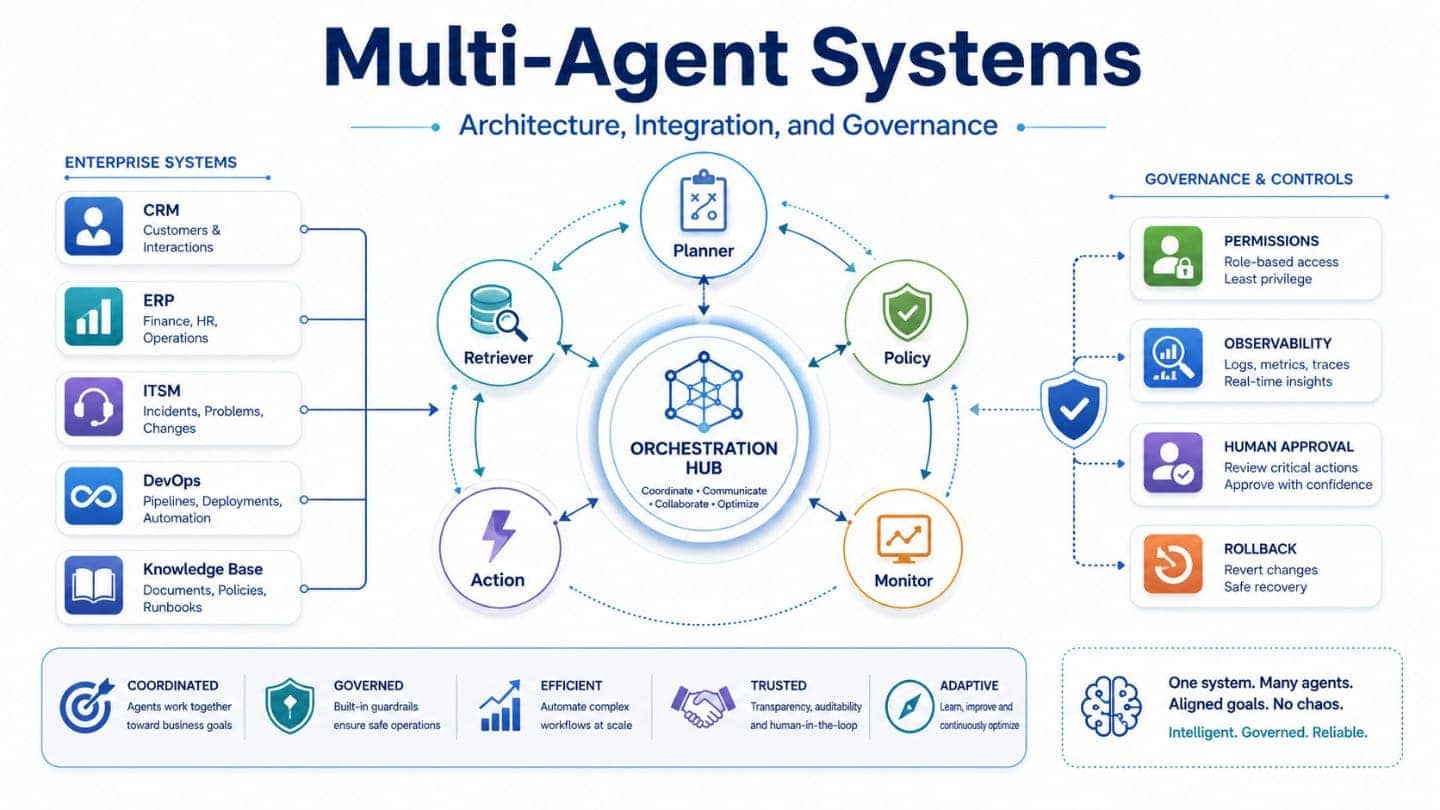
Most business processes are not single-step tasks. A support case may require ticket classification, knowledge search, entitlement validation, impact assessment, customer communication, and escalation. A procurement workflow may involve policy checks, vendor data, approval chains, contract review, and ERP updates. One general-purpose agent is rarely the best fit for all of this. Multi-agent systems split complex work into coordinated roles. Instead of one AI component trying to do everything, several specialized agents handle specific parts of a process:
- a planner agent breaks the task into steps;
- a retrieval agent gathers trusted business context;
- a validation agent checks policies, rules, and permissions;
- an execution agent triggers approved actions;
- a monitoring agent tracks outcomes and exceptions;
- a human review step handles sensitive or high-risk decisions.
This is the shift behind modern AI agent architecture. Enterprises are not just deploying chatbots. They are designing controlled systems of action where agents interact with data, applications, users, APIs, and human approvers.
From Prompt Experiments to Managed Agent Workflows
Early agent projects often start with prompts. A team connects a model to a tool, gives it instructions, and tests whether it can complete a task. That may work in a controlled demo, but enterprise software requires more structure. A production-grade agent workflow needs clear boundaries:
- What can the agent access?
- What can it change?
- Which system is the source of truth?
- When does the agent need approval?
- How is the action logged?
- What happens when the result is wrong?
- Can the workflow be paused, replayed, or rolled back?
Without these rules, AI agents may create duplicated work, inconsistent decisions, security gaps, or silent process failures. That is why AI agent orchestration matters. Orchestration defines how agents communicate, when they act, how tasks move between agents, which tools they can use, and how the enterprise controls the complete workflow.
The Real Architecture Behind Multi-Agent Systems
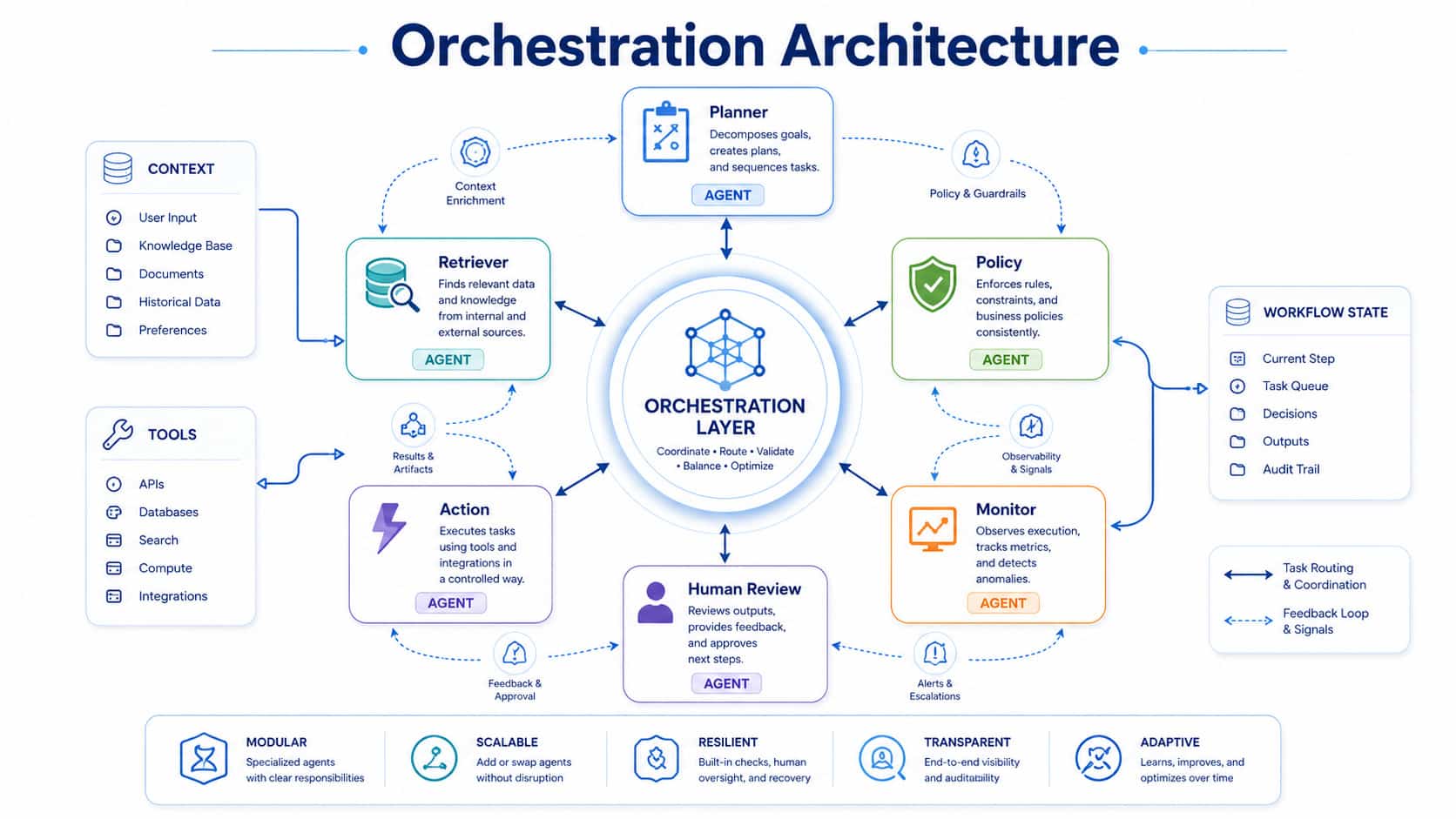
A reliable multi-agent system is not just a collection of prompts. It is a layered architecture that connects reasoning, data, workflows, permissions, monitoring, and governance.
1. Agent Roles and Responsibilities
Each agent should have a narrow purpose. Broad agents are harder to test, secure, and monitor. A practical enterprise setup may include:
- Intake agent: understands the user request and extracts intent.
- Planner agent: breaks work into tasks and selects the next step.
- Research agent: retrieves context from approved knowledge sources.
- Policy agent: checks rules, compliance limits, and risk conditions.
- Action agent: performs approved updates through APIs or workflow tools.
- Review agent: prepares a summary for human validation.
- Supervisor agent: monitors quality, conflicts, and escalation logic.
This role separation improves control. Teams can test agents independently, restrict permissions by function, and replace one agent without redesigning the whole system.
2. Orchestration Layer
The orchestration layer is the control center. It manages task routing, sequencing, state, retries, handoffs, and exceptions. Common orchestration patterns include:
- Sequential orchestration
Agents work in a fixed order. This is useful for structured workflows such as document intake, validation, approval, and record creation. - Parallel orchestration
Several agents work at the same time. This helps when a process needs data from multiple sources, such as CRM, ERP, ticketing, and knowledge bases. - Handoff orchestration
One agent transfers control to another based on context. For example, a support agent may hand a security-related case to a compliance agent. - Supervisor orchestration
A manager agent coordinates specialized agents, checks outputs, and decides the next step. - Human-in-the-loop orchestration
Agents prepare recommendations, but humans approve high-impact actions before execution.
For enterprise use, deterministic workflow logic should sit around probabilistic AI reasoning. In other words, agents can interpret, summarize, and recommend, but the business process should still enforce rules, approvals, access limits, and audit trails.
3. Context and Memory Management
Agents need context to work well. But not every agent should see every piece of data. Enterprise context usually includes:
- user profile and permissions;
- customer or employee history;
- business rules and policies;
- process state;
- system records;
- knowledge articles;
- previous decisions;
- open tasks and approvals.
The architecture must separate short-term task memory from long-term enterprise records. Short-term memory helps an agent complete a workflow. Long-term data should remain in trusted systems such as CRM, ERP, ITSM, HRIS, data platforms, or document repositories. This reduces hallucination risk and keeps systems of record in control.
4. Tool and API Access
Agents become useful when they can act. They may need to search documents, create tickets, update records, send notifications, generate reports, or trigger DevOps workflows. But tool access must be designed carefully. Every tool should have:
- scoped permissions;
- clear input and output schemas;
- validation rules;
- rate limits;
- approval requirements;
- logging;
- fallback behavior;
- rollback or compensation logic.
An agent should not receive broad system access just because it can reason. It should receive the minimum access required for its role.
Integration Patterns for Enterprise AI Automation
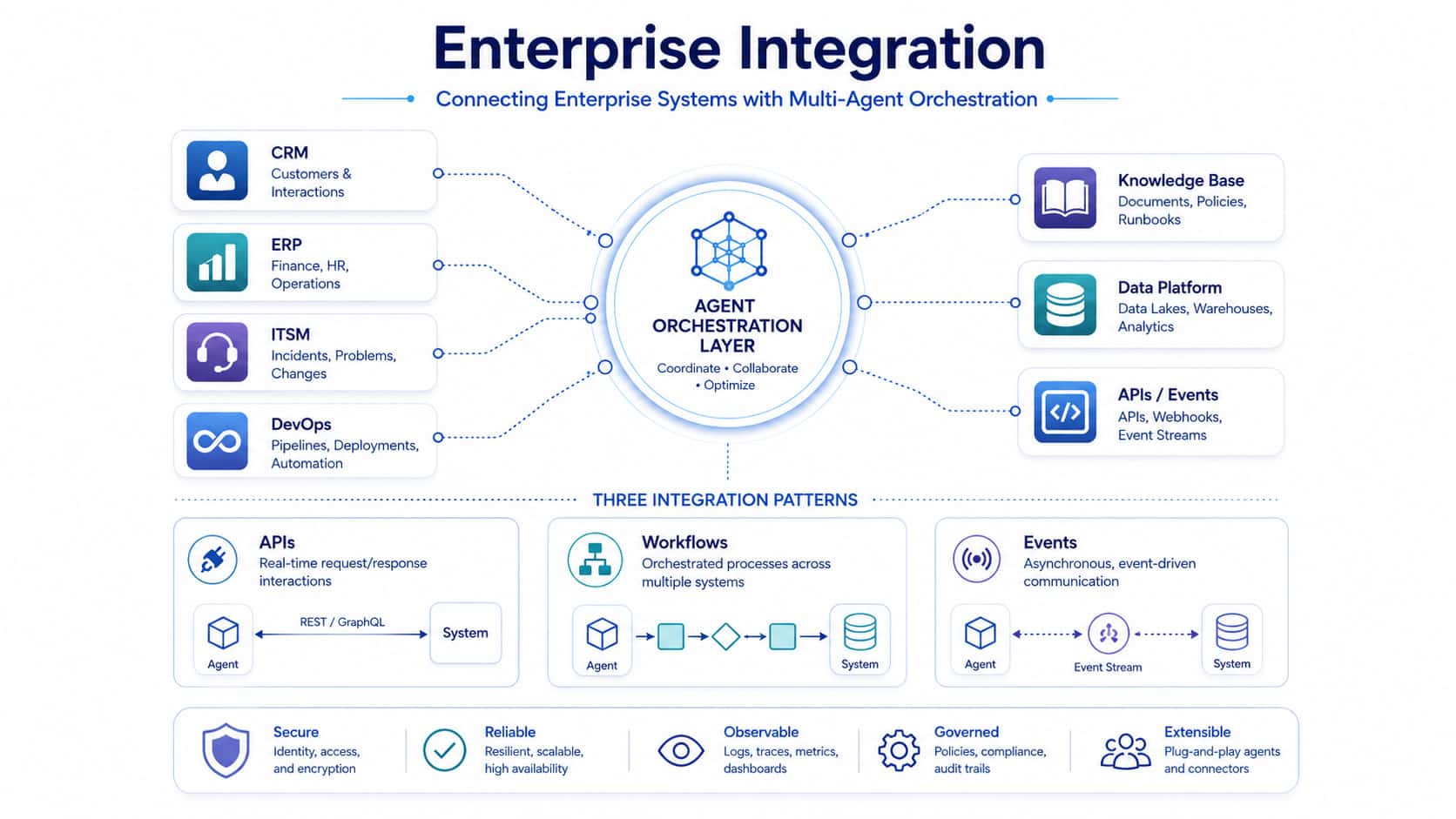
Multi-agent systems create value when they connect to real enterprise systems. The integration model should match the business process, risk level, and existing technology stack.
API-First Integration
API-first integration is the cleanest option when systems expose stable APIs. Agents can interact with:
- CRM platforms;
- ERP systems;
- ITSM tools;
- HR systems;
- data warehouses;
- document management systems;
- internal applications;
- cloud services.
This approach supports structured validation, access control, and audit logging.
Workflow Platform Integration
For many enterprises, agents should not bypass workflow platforms. They should operate through them. For example, ServiceNow-based environments may use agents to classify incidents, enrich tickets, recommend resolution paths, or trigger approved workflows. GFL supports organizations with ServiceNow services to help connect workflow automation with enterprise service operations. The benefit is control. The workflow platform remains the system of action, while agents improve speed, context, and decision support.
Event-Driven Integration
Event-driven architecture is useful when agents need to respond to business signals. Examples include:
- a new support ticket is created;
- a payment exception appears;
- a deployment fails;
- a contract reaches renewal stage;
- a security alert is detected;
- a customer submits a high-priority request.
Agents can subscribe to events, classify them, enrich them with context, and trigger the next approved workflow step.
DevOps and Platform Integration
AI agents can also support engineering operations. They may analyze logs, summarize incidents, generate release notes, check deployment readiness, or recommend remediation actions. However, engineering workflows require strong guardrails. Production changes should stay behind approvals, CI/CD controls, test gates, and rollback mechanisms. GFL’s DevOps services help teams build delivery pipelines where automation improves speed without weakening governance.
Governance Rules That Keep Agents Under Control
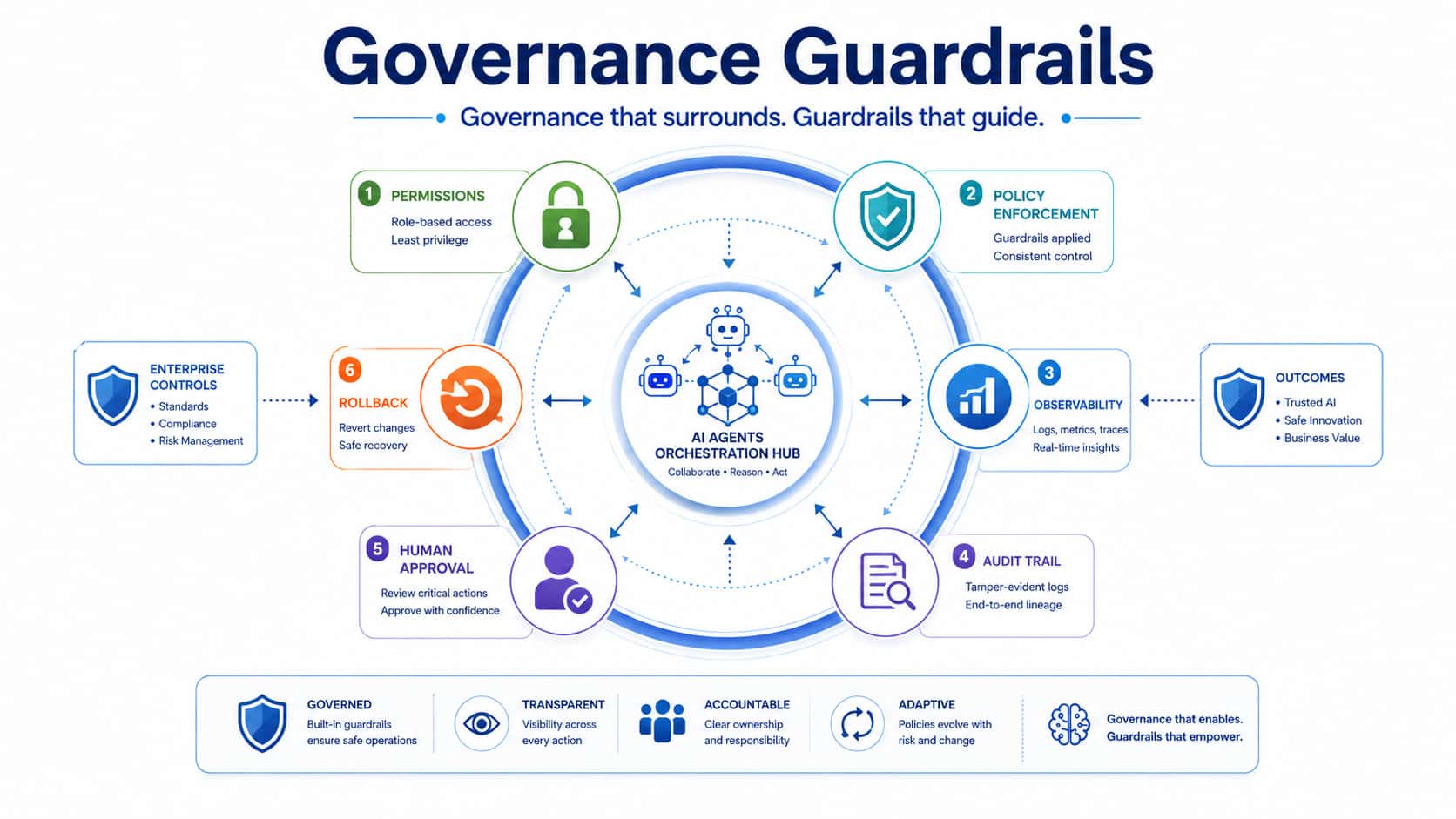
Multi-agent systems introduce a new governance challenge: agents may communicate with each other, use tools, make recommendations, and trigger workflow actions. That requires rules before scale.
Permission Boundaries
Each agent needs identity and access control. Enterprises should define:
- which data the agent can read;
- which actions it can perform;
- which APIs it can call;
- which workflows it can trigger;
- which users or roles it can serve;
- which decisions require human approval.
Agent identity should be treated as part of enterprise access management, not as a hidden technical detail.
Policy Enforcement
Policies should not live only inside prompts. They should be enforced through architecture. This may include:
- approval workflows;
- business rule engines;
- validation services;
- compliance checks;
- data loss prevention controls;
- exception handling;
- restricted tool execution;
- role-based access control.
Prompts can guide behavior. Systems must enforce behavior.
Observability and Auditability
Enterprise AI automation needs visibility. Teams should know what happened, why it happened, and which agent or workflow step caused it. A mature observability model includes:
- prompt and response logs where appropriate;
- tool call logs;
- API activity records;
- workflow state tracking;
- decision traces;
- error reports;
- latency and cost metrics;
- quality scoring;
- escalation records;
- human approval history.
Observability helps teams debug agent behavior, detect drift, improve performance, and support compliance reviews.
Rollback and Compensation
Not every process can be reversed. That is why rollback planning must happen before deployment. For low-risk actions, rollback may mean reverting a record update. For complex workflows, compensation may be more realistic: creating a correction ticket, notifying a stakeholder, restoring previous values, or sending the case to human review. Good agent design asks this question early: “What should happen if the agent completes the wrong action?”
Key Risks to Assess Before Scaling
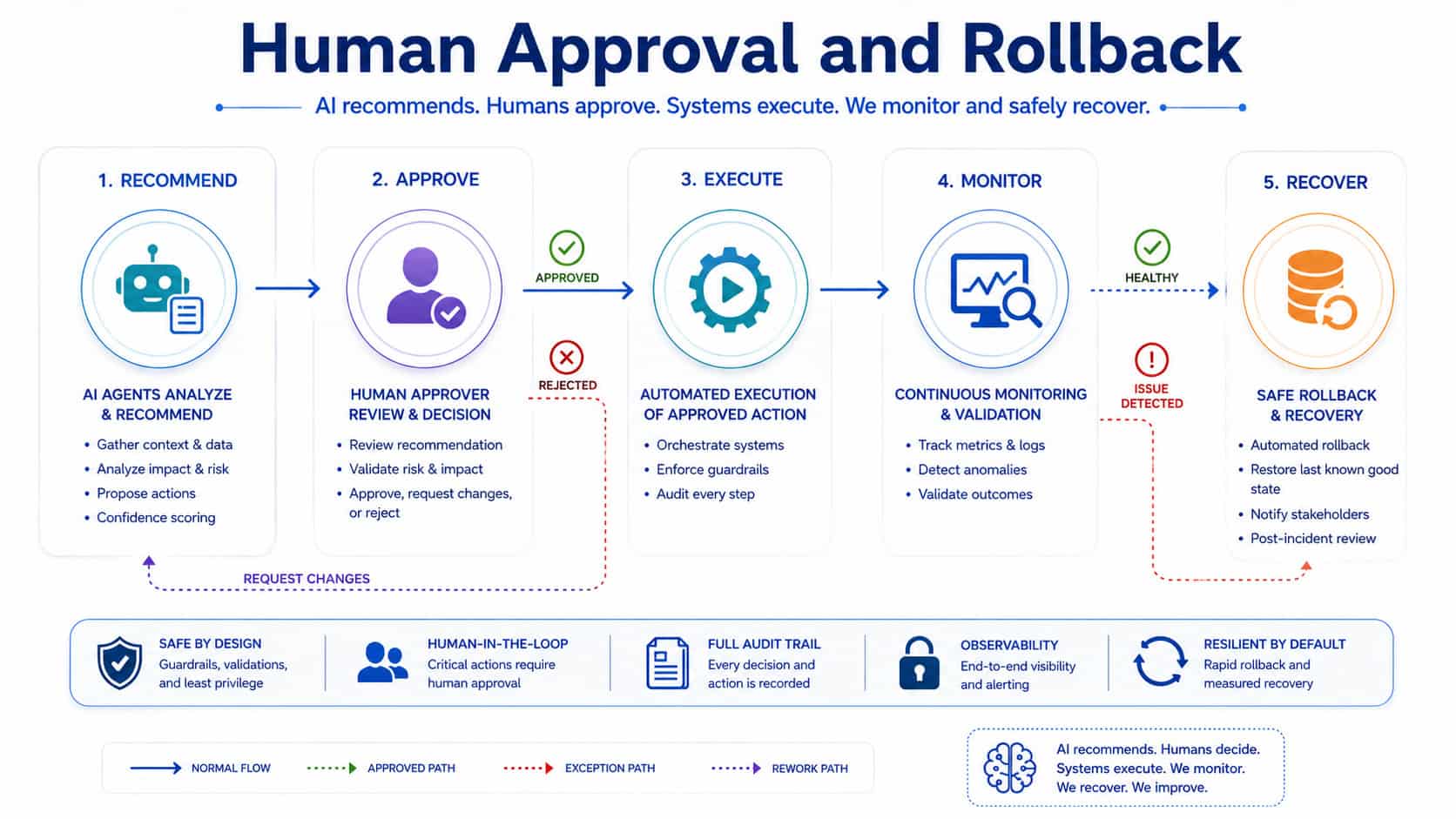
Multi-agent systems can improve speed and productivity, but they also create operational risks. The first step is not building more agents. The first step is risk classification.
Data Exposure
Agents may need access to sensitive records. Without proper controls, they can expose confidential information to the wrong user, system, or workflow. Mitigation:
- least-privilege access;
- data masking;
- role-based retrieval;
- secure connectors;
- policy checks before output;
- logging of sensitive data access.
Workflow Drift
Agents may start producing inconsistent results when prompts, models, data sources, or business rules change. Mitigation:
- versioned prompts;
- regression testing;
- evaluation datasets;
- controlled releases;
- monitoring for output quality;
- human review for edge cases.
Tool Misuse
An agent with tool access can create real business impact. If permissions are too broad, a wrong decision can update records, send messages, or trigger processes incorrectly. Mitigation:
- scoped tools;
- schema validation;
- approval gates;
- sandbox testing;
- rate limits;
- action-level audit trails.
Conflicting Agent Decisions
When several agents collaborate, their outputs may conflict. One agent may recommend escalation while another recommends closure. Mitigation:
- supervisor logic;
- confidence scoring;
- conflict resolution rules;
- deterministic business policies;
- final validation agent;
- human approval for high-impact cases.
Hidden Operational Cost
Multi-agent workflows may call several models, tools, and APIs. Costs can rise quickly if orchestration is inefficient. Mitigation:
- caching;
- task routing by complexity;
- smaller models for simple tasks;
- usage monitoring;
- cost budgets;
- workflow optimization.
A Safe Roadmap for Enterprise Adoption
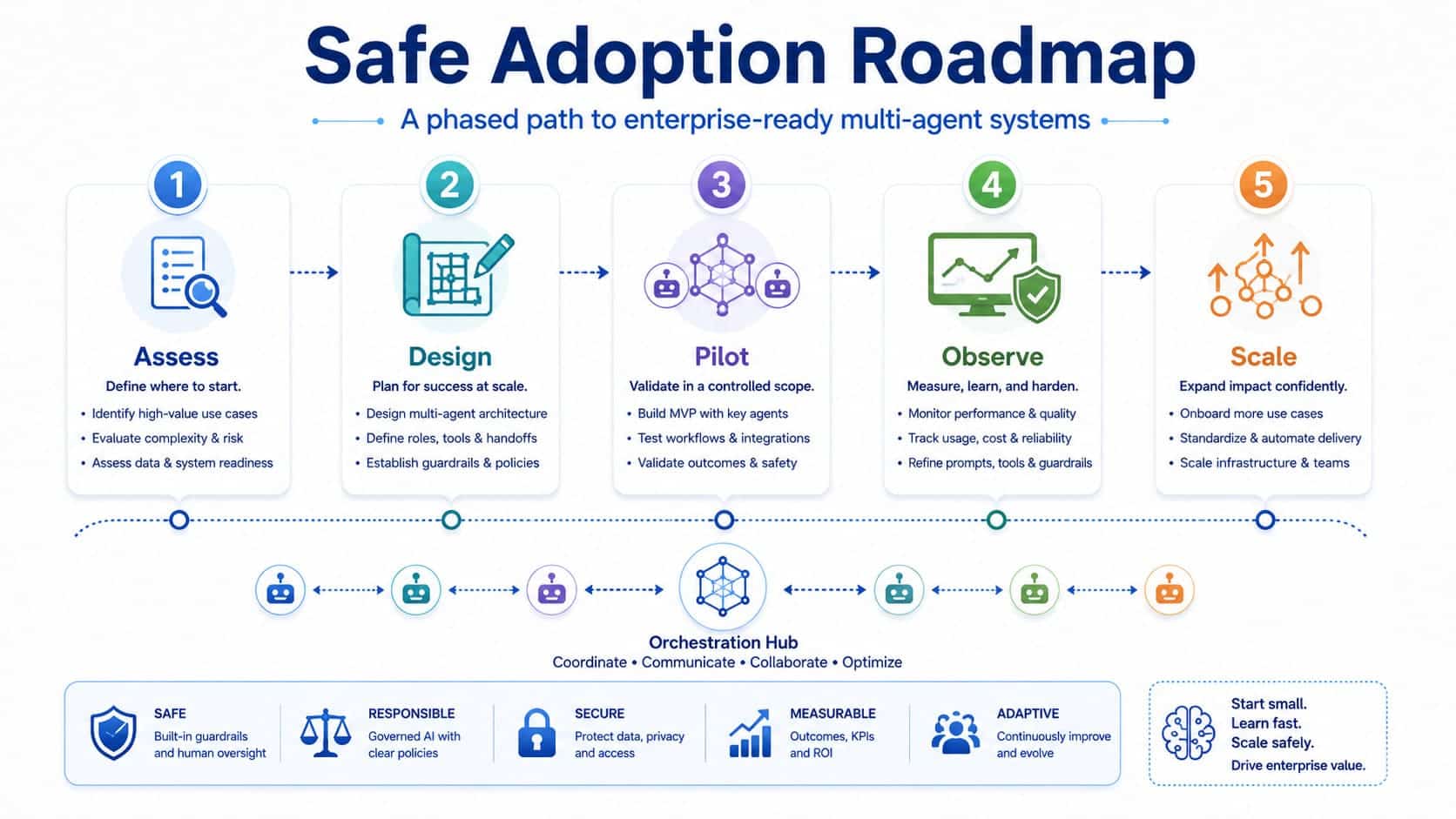
Companies do not need to automate everything at once. The safest path is controlled progression.
Step 1: Select a Workflow With Clear Boundaries
Start with a process that is repetitive, measurable, and valuable, but not dangerously open-ended. Good candidates include:
- ticket triage;
- knowledge article recommendations;
- request classification;
- document summarization;
- onboarding task guidance;
- incident report drafting;
- sales or support data enrichment.
Avoid starting with workflows that involve irreversible actions, regulated decisions, or complex judgment without human review.
Step 2: Map Systems, Data, and Permissions
Before building agents, map the workflow:
- systems involved;
- data sources;
- user roles;
- approval steps;
- decision points;
- exceptions;
- audit needs;
- current bottlenecks.
This creates the foundation for safe AI agent architecture.
Step 3: Design the Agent Model
Define which agents are needed and what each one can do. For each agent, document:
- purpose;
- inputs;
- outputs;
- tools;
- permissions;
- data access;
- escalation rules;
- failure behavior;
- owner.
This prevents agent sprawl and keeps the system maintainable.
Step 4: Build Guardrails Into the Workflow
Do not rely on prompt instructions alone. Add technical controls:
- identity and access management;
- API validation;
- approval gates;
- logging;
- redaction;
- policy checks;
- testing;
- rollback logic;
- monitoring dashboards.
These controls make the difference between a demo and enterprise-ready automation.
Step 5: Test With Realistic Scenarios
Multi-agent systems should be tested against normal cases, edge cases, and failure cases. Test for:
- incorrect input;
- missing data;
- conflicting outputs;
- unauthorized requests;
- sensitive data exposure;
- tool failure;
- slow API response;
- human rejection;
- duplicate actions;
- rollback requirements.
Testing should cover the full workflow, not only individual prompts.
Step 6: Expand Gradually
Once the first workflow is stable, expand by adding more tasks, agents, integrations, and departments. Scaling should be based on evidence:
- time saved;
- error reduction;
- user satisfaction;
- automation completion rate;
- escalation accuracy;
- cost per workflow;
- compliance findings;
- incident rate.
Enterprise AI automation should grow through measured adoption, not uncontrolled experimentation.
Where Multi-Agent Systems Create Business Value
When designed correctly, multi-agent systems help enterprises move from static automation to adaptive workflow execution. They can support:
- IT service management;
- customer support;
- finance operations;
- HR service delivery;
- procurement;
- compliance workflows;
- software delivery;
- knowledge management;
- security operations;
- internal productivity tools.
The value is not only speed. The larger benefit is coordination. Agents can connect data, tools, policies, and workflows across fragmented systems. For example, a support workflow can move from “agent suggests an answer” to “agent classifies the case, checks entitlement, retrieves context, drafts a response, recommends the next action, updates the ticket, and escalates when needed.” That is a more complete automation model.
Why Software Engineering Discipline Still Matters
Multi-agent systems may look like an AI topic, but production success depends heavily on software engineering. Enterprises need:
- architecture design;
- secure integrations;
- workflow engineering;
- API development;
- DevOps practices;
- testing automation;
- observability;
- data governance;
- maintainable code;
- release management.
This is why multi-agent systems should be treated as enterprise software, not as a prompt library. GFL helps companies design, build, integrate, and modernize business software with a focus on practical delivery. Our software development services support the engineering foundation needed for secure AI-enabled automation, from custom applications and integration layers to scalable backend systems and workflow logic.
Choose the Right Operating Model
Before building, enterprises should decide how agent work will be owned. A practical operating model includes:
- Business owner: defines process goals and success metrics.
- Product owner: manages scope, user needs, and roadmap.
- Solution architect: designs the agent and integration architecture.
- Security lead: reviews access, data exposure, and compliance risks.
- DevOps team: manages environments, releases, and monitoring.
- Data owner: validates data quality and source-of-truth rules.
- Human reviewers: approve sensitive outputs and handle exceptions.
This structure keeps agent development aligned with business outcomes and governance.
Practical Architecture Checklist
Use this checklist before moving a multi-agent workflow into production.
Workflow readiness
- The process is mapped end to end.
- Business rules are documented.
- Exceptions are defined.
- Human approval points are clear.
- Success metrics are measurable.
Agent design
- Each agent has a narrow role.
- Inputs and outputs are structured.
- Tool access is scoped.
- Permissions are role-based.
- Escalation rules are defined.
Integration
- APIs are stable and documented.
- Systems of record remain authoritative.
- Data flow is traceable.
- Sensitive fields are protected.
- Workflow states are logged.
Governance
- Prompt and configuration versions are controlled.
- Logs support audit needs.
- Quality metrics are tracked.
- Rollback or compensation paths exist.
- Security review is complete.
Operations
- Monitoring is in place.
- Failure alerts are configured.
- Cost tracking is active.
- Support ownership is assigned.
- Release process is documented.
Let’s Sum Up
Multi-agent systems are becoming a serious enterprise automation pattern because they reflect how business work actually happens: across roles, systems, decisions, approvals, and exceptions. But agents do not remove the need for architecture. They increase it. The companies that succeed will not be the ones that deploy the most agents. They will be the ones that coordinate agents through secure workflows, clear permissions, reliable data context, strong observability, and practical governance.
Design Safe Agent Orchestration with GFL
If your organization is exploring multi-agent systems, GFL can help you assess the right use cases, design AI agent architecture, integrate agents with enterprise platforms, and build automation that is secure, observable, and ready for real operations.
FAQs
What are multi-agent systems?
Multi-agent systems are software architectures where multiple AI agents work together to complete complex tasks. Each agent usually has a specific role, such as planning, retrieving data, checking policy, executing an action, or escalating a case.
Why does it matter for enterprise software?
Enterprise processes are rarely simple. They involve many systems, users, rules, and approval steps. Multi-agent systems help coordinate this complexity by assigning specialized agents to different parts of a workflow while keeping the process controlled through orchestration and governance.
How can a company start safely?
Start with one bounded workflow, such as ticket triage, document summarization, or knowledge retrieval. Define data access, permissions, approval points, testing rules, and success metrics before expanding to more complex automation.
What risks should be assessed first?
The first risks to assess are data exposure, unauthorized tool use, workflow errors, lack of auditability, unclear rollback options, and over-automation of decisions that still need human judgment.
How can GFL help?
GFL can help design the architecture, integration model, workflow logic, governance controls, and implementation roadmap for enterprise AI automation. Our teams support custom software development, DevOps, ServiceNow workflows, backend integration, and secure automation delivery.